In this guide
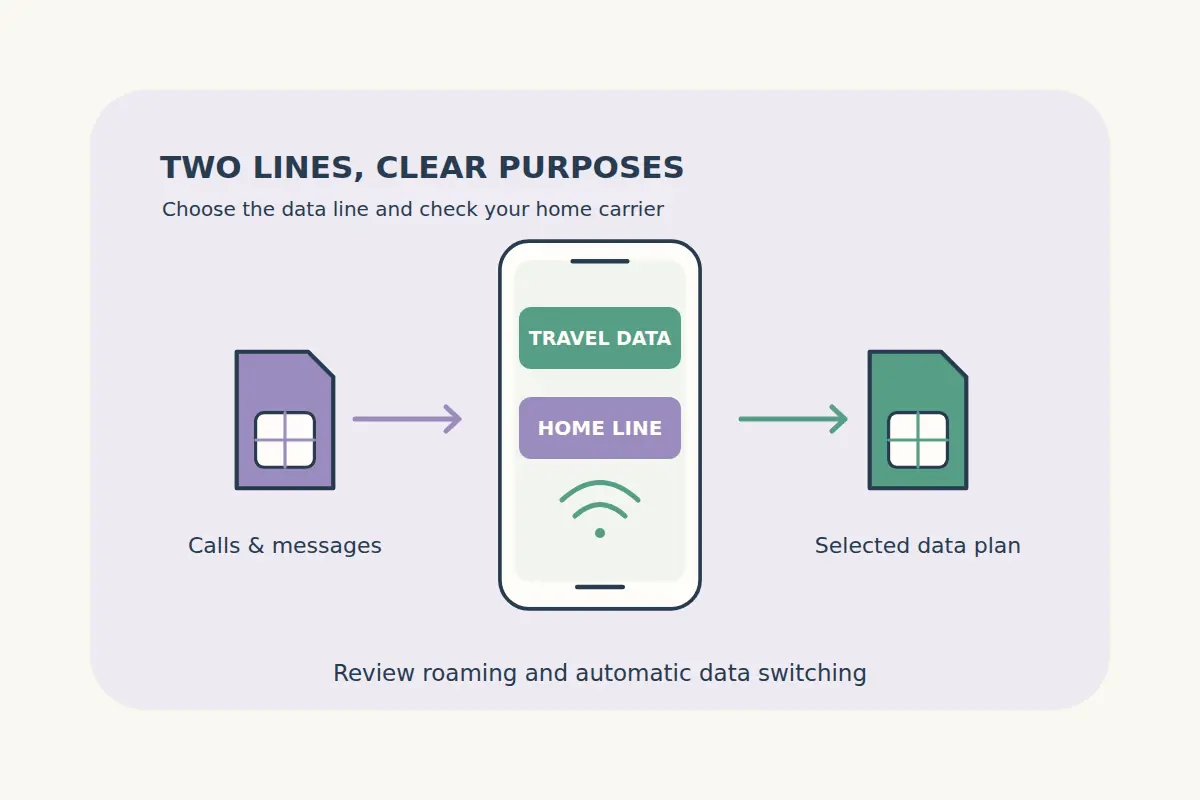
A compatible dual-SIM phone can let you keep a home line available while using a separate travel plan for data. The important part is deciding which line handles each task. Installing a travel eSIM does not by itself disable the home line's data use or establish what your home carrier charges for calls and messages abroad.
Check the device, the selected eSIM and both carriers' conditions before departure. The right settings depend on your phone and what you need to keep working.
Confirm that your device supports the arrangement
Check compatibility, carrier unlocking and how many profiles can be active together on your exact model. A phone may store several eSIM profiles without allowing all of them to operate simultaneously. Regional device variants and carrier conditions can also matter.
Apple's dual-SIM guide explains supported arrangements and line preferences on iPhone. Google's Pixel dual-SIM guide describes supported combinations and data, calling and message preferences. Use the instructions for your own device and software rather than assuming all Android phones have identical menus.
Use the compatibility information as a starting point, then confirm the actual model and unlocking status before buying.
Assign a purpose to each line
| Setting or need | Decision to make | What to check |
|---|---|---|
| Mobile data | Which line should supply the travel connection? | The selected travel eSIM and its allowance. |
| Data roaming | Which line's roaming should be enabled or disabled? | Travel-plan instructions and the home carrier's conditions. |
| Automatic data switching | Whether another line may supply data automatically. | The device setting and possible home-line usage. |
| Calls and SMS | Which number you need to keep available. | Home-carrier roaming, service and charges. |
| App messaging | Which connection supplies internet access. | The app's account and number settings. |
Give the lines clear names, such as Home and Travel Data. That makes it easier to check the selected line after installation or a network change.
Select the intended data line and review switching
After installing the plan under its instructions, select the travel eSIM for mobile data when it should become active. Check the line's identity instead of choosing the first unfamiliar network name.
Review any option that automatically switches data to another SIM. If your aim is to avoid home-line data use, understand or disable that behavior under the device's instructions. A working travel connection does not prove the home line cannot also incur usage.
Recheck the selected data line if the phone asks you to change defaults, if you add another profile or if service behaves unexpectedly. Keep the package's activation policy in mind rather than testing it early without reading when validity starts.
Apply roaming settings to the correct line
Some travel plans require data roaming to be enabled on the travel eSIM. Follow that selected plan's setup instructions. This is different from enabling data roaming on your home subscription.
Do not treat a global instruction to turn all roaming off as a substitute for checking each line. Set the home line according to your carrier's conditions and the usage you intend to allow, while configuring the travel line according to its own instructions.
If you cannot determine which setting belongs to which profile, pause the setup and check the official device guidance or ask for help. Avoid deleting profiles simply to identify them.
Check home-number calls and messages separately
Keeping a home line enabled may help preserve access to its number, but receiving calls or messages depends on that carrier, coverage and your account. Data roaming settings alone do not determine every voice, SMS, voicemail or Wi-Fi calling charge.
Ask your home carrier about the services you intend to use abroad, including incoming calls, outgoing messages and Wi-Fi calling. Do not assume all incoming verification messages will arrive or that every service is free. Check important account-access arrangements before travel.
A data-only travel eSIM does not itself provide ordinary telephone service or a local number. Our calls and SMS guide explains what to verify in a package that advertises those features.
Keep app accounts and arrival instructions organized
An app's account number and the SIM providing its internet connection can be separate. Our WhatsApp number guide explains that distinction. Do not change an app's registered number simply because you installed a data plan unless that change is what you intend.
Before departure, save the eSIM instructions, the selected plan's coverage and the first hotel address offline. Compare travel eSIM destinations by allowance, validity, activation policy and actual supported countries.
After arrival, confirm the selected data line and that the plan is working under its instructions. Our connection troubleshooting guide covers the next checks if it does not connect.
Dual-SIM travel questions
Does installing a travel eSIM automatically stop home-line roaming?
No. Review the data line, roaming and switching settings and check your home carrier's conditions.
Can I keep my home number while using travel data?
A supported dual-SIM arrangement can allow that, subject to the phone, carrier and active-profile configuration.
Should data roaming be on for every SIM?
No universal setting applies to both. Configure the travel line under its instructions and the home line for your intended usage.
Does a data eSIM guarantee delivery of my bank's SMS?
No. Ordinary messages to your home number depend on the relevant carrier and service, separately from travel data.